| app | ||
| binaries | ||
| external | ||
| gradle | ||
| playstore | ||
| scripts | ||
| Android.mk | ||
| build.gradle | ||
| Changelog.md | ||
| gradle.properties | ||
| gradlew | ||
| gradlew.bat | ||
| LICENSE | ||
| README.md | ||
| settings.gradle | ||

AFWall+ (Android Firewall+)






Your Privacy, Your Control - AFWall+ gives you complete control over which apps can access the internet on your Android device.
💝 Support AFWall+ Development
AFWall+ is developed and maintained by volunteers in their free time. If you find it useful, consider supporting the project:
💰 Making Donations
Why Donate? AFWall+ is completely free and open-source. Your donations help:
- 🔧 Continue development - Fund new features and maintenance
- 🐛 Bug fixes and testing - Keep the app stable and secure
- 📱 Device compatibility - Support more Android versions and devices
- 🌍 Community support - Help users and maintain documentation
Donation Options:
- PayPal:

- Google Play: Purchase the unlocker key for additional features
- Amazon Gift Cards:
cumakt+amazon@gmail.com - Bitcoin:
bc1q54nf3y9zmdcpasxx9sywkprd6309rfhav3mape - Ethereum:
0x5e65649C2B26eD816fCeD25a8E507C90D4b1D697
🌟 Other Ways to Help
- ⭐ Star this repository
- 🐛 Report bugs and test new features
- 🌐 Contribute translations on Crowdin
- 📝 Improve documentation
- 💬 Help other users in forums
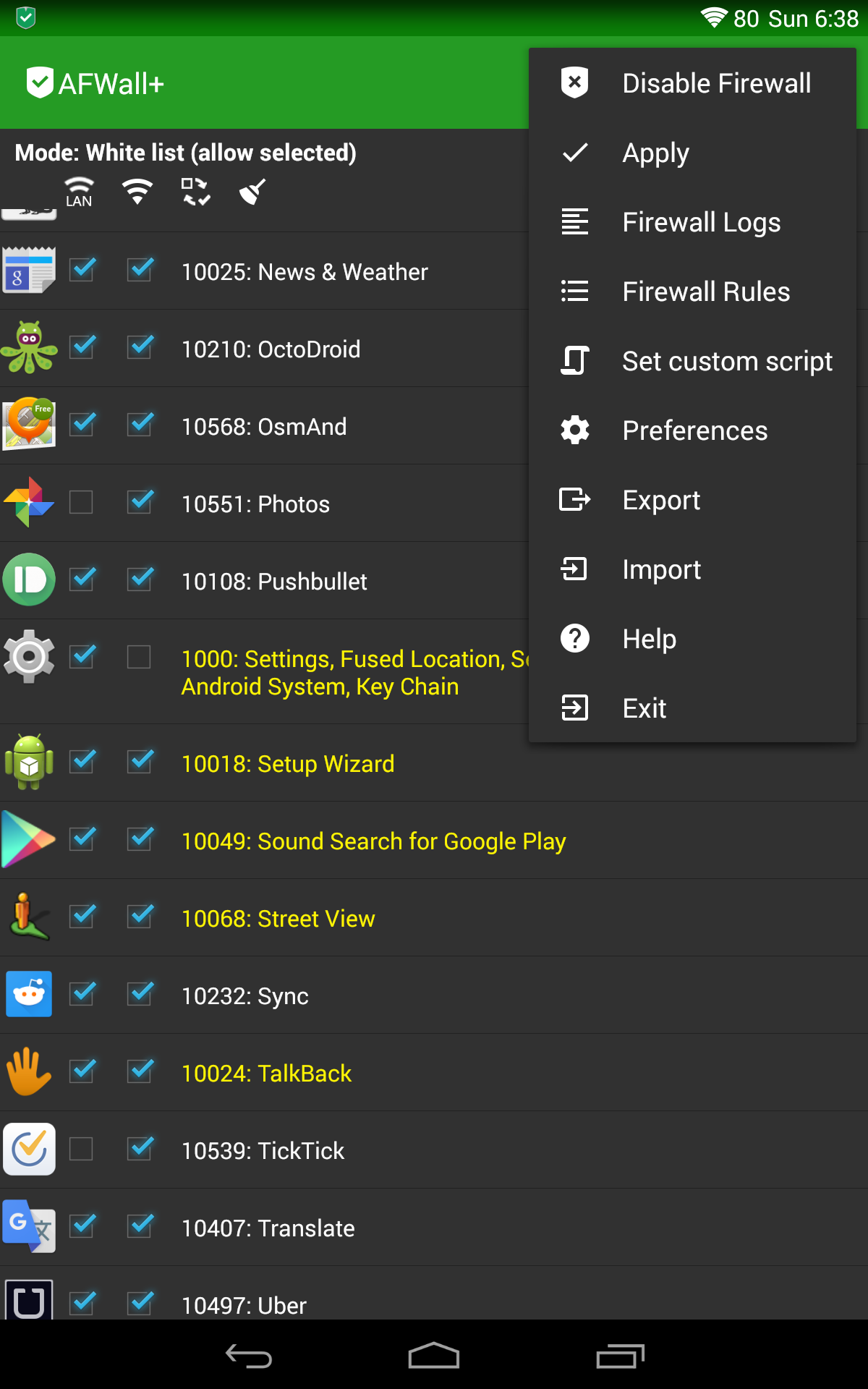
🔥 What is AFWall+?
AFWall+ (Android Firewall+) is a powerful, open-source firewall application for rooted Android devices. Built on Linux's robust iptables framework, AFWall+ provides granular network control at the system level - something impossible with standard Android permissions.
🎯 Core Purpose
- Block unwanted network access by apps, even when they have internet permission
- Prevent data leaks and unauthorized background connections
- Monitor network activity with comprehensive logging
- Save battery and data by controlling which apps can connect when
- Enhance privacy by blocking tracking and analytics
🛡️ How It Works
AFWall+ operates at the Linux kernel level using iptables rules to:
- Intercept all network requests before they leave your device
- Apply custom firewall rules based on your preferences
- Allow or block connections per app, per network type (WiFi, mobile, VPN)
- Log blocked attempts for monitoring and analysis
This approach is far more powerful than app-level solutions because it works regardless of how apps try to connect to the internet.
🌟 Key Features
🔐 Granular Control
- Per-app network rules - Allow/block individual apps
- Network type filtering - Different rules for WiFi, mobile data, VPN, tethering
- IPv4 & IPv6 support - Complete protocol coverage
- Custom rule scripting - Advanced users can write custom iptables rules
🎛️ User Experience
- Clean, intuitive interface - Easy to understand app list with clear allow/block controls
- Quick search & filtering - Find apps instantly, sort by name, install date, or permissions
- Bulk operations - Enable/disable rules for multiple apps at once
- Profile management - Switch between different rule sets (home, work, travel)
📊 Monitoring & Logging
- Real-time network monitoring - See which apps are trying to connect
- Detailed connection logs - Track blocked attempts with timestamps and destinations
- Notification system - Get alerts for blocked connection attempts
- Export/import rules - Backup your configuration or share with others
🔧 Advanced Features
- Boot protection - Apply rules before apps start (prevents data leaks during startup)
- Startup delay management - Robust boot rule application with network change handling
- Multi-user support - Different profiles for different Android users
- Tasker/Locale integration - Automate firewall based on conditions
- Password protection - Secure your firewall settings
- Tor and VPN detection - Special handling for privacy networks
🌐 Network Types Supported
- 📶 Mobile Data (3G/4G/5G) - including roaming detection
- 📡 WiFi - home, work, public hotspots
- 🔗 VPN - all VPN types and providers
- 🔄 Tethering - WiFi hotspot, USB, Bluetooth
- 🧅 Tor - onion routing support
- 🏠 LAN - local network access
📋 System Requirements
✅ Compatibility
- Android versions: 5.0 (API 21) to 14+ (actively maintained)
- Legacy support: Android 4.x (version 2.9.9), Android 2.x (version 1.3.4.1)
- Root access: Required (Magisk, SuperSU, LineageOS su)
- Architectures: ARM, ARM64, x86, x86_64
- Storage: ~15MB app + ~5MB for binaries
🔧 Root Methods Supported
- ✅ Magisk (recommended)
- ✅ LineageOS built-in su
- ✅ SuperSU (legacy)
- ✅ KingRoot (not recommended)
🚫 Limitations
- Requires root access - No root = no functionality
- Not an antivirus - Doesn't scan files for malware
- Not an ad-blocker - Blocks network access, not ads within allowed connections
- VPN conflicts - Some VPN apps may interfere with firewall rules
- System-level apps - Some system processes may bypass rules if they have root access
🚀 Quick Start Guide
1. Pre-Installation
# Verify root access
su -c "id"
# Should return: uid=0(root) gid=0(root)
2. Installation
- Install AFWall+ from your preferred source
- Grant root permission when prompted
- Enable firewall in main screen
3. Basic Configuration
- Enable the firewall - Toggle the main switch
- Configure apps - Tap apps to allow WiFi (green) or mobile data (orange)
- Apply rules - Tap the apply button (firewall icon)
- Test connectivity - Verify apps work as expected
4. Essential Settings
- Boot startup delay: Prevents rule conflicts during boot
- Notification settings: Control alert behavior
- Log settings: Enable if you want connection monitoring
🔧 Advanced Configuration
📝 Custom Rules
AFWall+ supports custom iptables rules for advanced users:
# Example: Allow specific IP range
-A afwall-wifi -d 192.168.1.0/24 -j ACCEPT

# Example: Block specific port
-A afwall -p tcp --dport 443 -j REJECT
🔄 Profiles
Create different rule sets for different scenarios:
- Home: Relaxed rules for trusted network
- Work: Restrictive rules for corporate network
- Public: Maximum security for public WiFi
- Travel: Balanced rules for mobile use
📊 Logging Configuration
- Packet logging: Uses nflog for detailed connection tracking
- Log rotation: Automatic cleanup of old logs
- Export options: Save logs for external analysis
🌍 Language Support
AFWall+ is available in 40+ languages thanks to our community translators:
🇺🇸 English • 🇪🇸 Español • 🇫🇷 Français • 🇩🇪 Deutsch • 🇮🇹 Italiano • 🇷🇺 Русский • 🇨🇳 中文 • 🇯🇵 日本語 • 🇰🇷 한국어 • 🇵🇹 Português • 🇳🇱 Nederlands • 🇵🇱 Polski • 🇹🇷 Türkçe • 🇸🇦 العربية • 🇮🇳 हिंदी • And many more!
Want to help translate? Join our Crowdin translation project.
🛠️ Development
🏗️ Building from Source
Prerequisites
- Android SDK (API level 21+)
- Java 17+
- Git
- Android NDK (for native binaries)
Quick Build
git clone https://github.com/ukanth/afwall.git
cd afwall
./gradlew clean assembleDebug
Native Binaries
To compile iptables, busybox, and other native components:
# Requires Android NDK
export NDK=/opt/android-ndk-r25
make -C external NDK=$NDK
📁 Project Structure
afwall/
├── app/src/main/java/dev/ukanth/ufirewall/
│   ├── Api.java                    # Core iptables interface
│   ├── MainActivity.java           # Main UI
│   ├── InterfaceTracker.java       # Network state monitoring
│   ├── util/BootRuleManager.java   # Boot rule application
│   ├── service/                    # Background services
│   ├── broadcast/                  # System event receivers
│   └── log/                        # Logging subsystem
├── app/src/main/res/raw/           # Native binaries (iptables, busybox)
├── external/                       # Native binary sources
└── scripts/                        # Build scripts
🧪 Testing
# Run lint checks
./gradlew lint

# Run unit tests
./gradlew test

# Install debug build
./gradlew installDebug
🤝 Contributing
We welcome contributions! Here's how you can help:
🐛 Bug Reports
- Check existing issues first
- Follow our bug report guide
- Include device info, Android version, and logs
💡 Feature Requests
- Open an issue with the "enhancement" label
- Describe the use case and expected behavior
- Consider if it fits AFWall+'s scope and philosophy
👨💻 Code Contributions
# Standard GitHub workflow
1. Fork the repository
2. Create a feature branch: git checkout -b feature-name
3. Make your changes and test thoroughly
4. Submit a pull request with clear description
🌐 Translations
- Join our Crowdin project
- No technical knowledge required
- Help make AFWall+ accessible worldwide
📞 Community & Support
💬 Discussion Forums
- XDA Thread: Official community discussion
- GitHub Issues: Technical problems and feature requests
- Wiki: Comprehensive documentation
❓ Frequently Asked Questions
Before reporting issues, check our FAQ for common solutions.
🆘 Getting Help
- Check the FAQ and wiki
- Search existing GitHub issues
- Ask on XDA forums
- Create a new GitHub issue (last resort)
📖 Technical Details
🔧 Architecture
AFWall+ uses a layered architecture:
- UI Layer: Android activities and fragments for user interaction
- Service Layer: Background services for rule application and monitoring
- Core Layer: iptables rule generation and management
- System Layer: Native binaries and root shell interface
🏗️ Key Components
- BootRuleManager: Robust boot-time rule application with race condition prevention
- InterfaceTracker: Network interface monitoring and change detection
- Api.java: Central iptables command generation and execution
- FirewallService: Background service for continuous monitoring
- LogService: Network packet logging and analysis
📱 Android Integration
- Broadcast Receivers: Monitor system events (boot, network changes, app installs)
- Content Providers: Share configuration data securely
- Notification System: User alerts for blocked connections
- Quick Settings Tile: Fast firewall toggle (Android 7+)
🏆 Acknowledgements
AFWall+ builds upon the work of many open-source projects and contributors:
🌟 Origins
- Original concept: Derived from DroidWall by Rodrigo Rosauro
- Current maintainer: Umakanthan Chandran
📚 Libraries & Dependencies
| Component | License | Purpose |
|---|---|---|
| iptables | GPL v2 | Linux firewall framework |
| BusyBox | GPL v2 | Unix utilities |
| libsuperuser | Apache 2.0 | Root access management |
| libsu | Apache 2.0 | Modern root interface |
| Material Dialogs | MIT | UI components |
| DBFlow | MIT | Database ORM |
| PrettyTime | Apache 2.0 | Human-readable timestamps |
👥 Contributors
Thanks to all contributors who have helped improve AFWall+ over the years!
📄 License
AFWall+ is released under the GNU General Public License v3.0.
Copyright (C) 2009-2011 Rodrigo Zechin Rosauro
Copyright (C) 2011-2024 Umakanthan Chandran

This program is free software: you can redistribute it and/or modify
it under the terms of the GNU General Public License as published by
the Free Software Foundation, either version 3 of the License, or
(at your option) any later version.

This program is distributed in the hope that it will be useful,
but WITHOUT ANY WARRANTY; without even the implied warranty of
MERCHANTABILITY or FITNESS FOR A PARTICULAR PURPOSE. See the
GNU General Public License for more details.
Full license text: LICENSE file or gnu.org/licenses/gpl-3.0
Made with ❤️ for Android privacy and security
AFWall+ - Your Network, Your Rules